
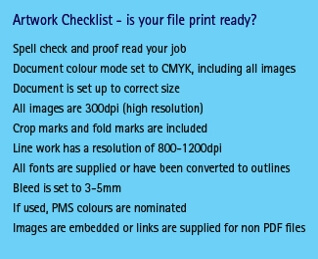
 Setting up a file for print can be complex, especially if you have not done so before. To ensure your job prints the way you want it to, read through our top tips.
Setting up artwork starts by using the right software to create your document. Ideally, you should consider using Adobe InDesign, Illustrator or Photoshop.
To ensure your artwork is going to be suitable to print, you should have a chat with your Kwik Kopy Account Manager. Talking to them before you start the job may save you valuable time later. If you do not have the correct software for the job, the graphic designers at your Kwik Kopy Centre can create the perfect artwork for you.
If you create your own artwork it must meet a number of print specifications to ensure it prints accurately and provides you with the result you require. The following checklist will help you make the right decisions:
File formats
While we prefer PDF files, we can generally accept a range of files including:
- Adobe InDesign
- Adobe Illustrator
- Adobe Photoshop
- MS Word
- MS Powerpoint
- MS Excel
- QuarkXpress
- Corel Draw
- TIFF
- EPS
For more handy design and printing tips, head to your nearest Kwik Kopy Centre.